
FAQ
Where Can I Download The Latest Version?
Visit The Port portal and download the latest Green Train release from there.
Where Should I Install The SDK?
We highly recommend installing the SDK on a machine that is isolated from the AS AppServer where the AS Interface is running. This helps avoid overlapping services and prevents potential interference between the SDK and the live AutoStore interface environment.
Why Isn't My Simulation Starting?
Please try loading one of the provided grids (Basic, Medium, Advanced). If these work, you will need to obtain a different .aslog file for the grid you want to load. If the sample grids do not work either, check that your antivirus is not removing any necessary SDK files and have your company’s IT department whitelist the SDK software.
WMS SDK Starts And Then Stops Unexpectedly?
Deleting C:\ProgramData\AutoStore will resolve this issue in most cases.
Usually, it is sufficient to delete only C:\ProgramData\AutoStore\PortManager.
However, deleting the entire AutoStore folder is also safe—just make sure to back up any logs that may be needed beforehand.
Why Are Robots Not Moving Or Delivering Bins?
If your simulation is running but the robots do not deliver bins, try loading one of the provided grids (Basic, Medium, Advanced). If these grids work, you will need to obtain a different .aslog file for the grid you want to use. If it still does not work, ensure that you are using the correct software (Planner or Router) for the modules on your grid.
For example, the FusionPort™ only works with Router software. If your grid does not include newer modules, you can also test using Planner software.
I Clicked The "Export" .aslog Button, But Nothing Happened?
By default, the .aslog export is saved to the Desktop. Check there for your exported file.
Can I Run Multiple Systems?
It is not possible to run multiple simulations from the WMS SDK on the same machine. To simulate a multi-grid system, it is recommended to set up simulations on two separate machines or virtual machines (VMs).
I Get "Unable to reach keygen.sh" Error?
For detailed information on Keygen connectivity and API endpoints, please visit the dedicated section here.
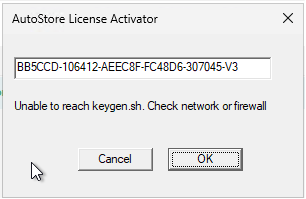
License activation error.
I Get "Invalid License" Error?
The current key is likely already in use or tied to another product. Please request a new license key.
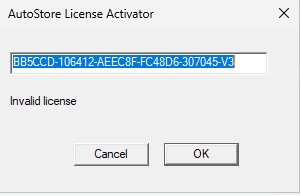
"Invalid license", "Serial is invalid" or "Serial is for another product" error.
Where Can I Find Logs?
| Logs | Location Path |
|---|---|
| AS Driver Logs | C:\ASDriverLog |
| WMS SDK Logs | C:\ProgramData\AutoStore\WMS SDK\Logs |
| Interface Logs | C:\ProgramData\AutoStore\Interface\RequestLogs |
| Backup Logs | C:\ProgramData\AutoStore\Backup\Logs |
What Are The Requirements To Run The WMS SDK?
The minimum system requirements are as follows:
- CPU: Intel® Core™ i7-6700 or equivalent
- Cores: 4
- Threads: 8
- CPU Cache: 8 MB
- Memory: 16 GB DDR4 (2400 MHz)
- Operating System:
- Windows 11
- Windows 10, version 1803 or later
- Windows Server 2019 or later
How Can I Run Interface V1 In WMS SDK?
If you want to run V1 of the Interface, you need to install AutoStore Interface and AutoStore Interface Http:
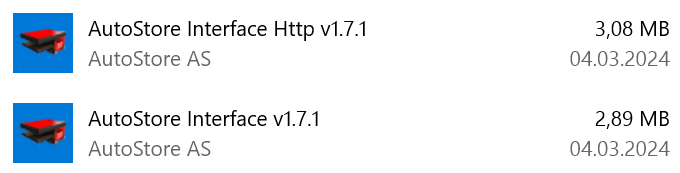
Required installations.
The WMS SDK by default runs the V2 of the interface which has different endpoints, port requirements and some other minor changes (see the migration guide V2 for more details). To use V1 of the interface just go to the services and make sure that the service AutoStore Interface is Running, this is the interface V1.

AutoStore Interface is running.
Interface V1 and V2 can both run in parallel, these are the only two modules that can do this. However you should NOT use both endpoints simultaneously.
Where Is The App.config File Located?
The file location is: C:\Program Files\AutoStore\AutoStore WMS SDK\packages\logpublisher\1.34.0.
Some Segments Are Not Published?
Check the App.config file and enable missing segments:
<?xml version="1.0" encoding="utf-8" ?>
<configuration>
  <appSettings>
    <add key="driveraddr" value="127.0.0.1"/>
    <add key="clientport" value=""/>
    <add key="encryptedclientport" value=""/>
    <add key="binoffset" value="0"/>
    <add key="sendroboterror" value="0"/>
    <add key="sendporterror" value="0"/>
    <add key="sendcelldefinition" value="1"/>
    <add key="sendbindeliverytimeestimate" value ="0"/>
    <add key="certificate" value=""/>
  </appSettings>
</configuration>
Can The WMS SDK Run On Cloud Or VM?
Yes, the WMS SDK supports cloud and virtual machine environments. To keep the license valid across reboots, migrations, or cloning, the VM must retain the same UUID. If the UUID changes, the license may need to be reactivated.
Updated 2 months ago