
Bin Modes And Lifecycle
Bin Mode
It reflects both the preparation status and if the Bin is open in a port. The Bin mode can be one of the following:
| Mode | Description |
|---|---|
GRID | Bin is in a grid. |
FORECAST | Bin is in a grid and is forecast. |
PREPARED | Bin is prepared in a Grid. |
PORT | Bin is in a Port, ready to be opened. |
TOGRID | Same as PORT, but the Bin is requested back to Grid because it is needed elsewhere. |
OPEN | Bin is open in a Port. |
CLOSED | Bin is in a Port, ready to be returned to Grid. |
OUTSIDE | Bin is removed (temporary) from the system. |
DELETED | Bin is deleted from the system. |
Mode Transitions
Normally, a Bin cycles through the following modes:
- Picking and putaway process: (
FORECAST) →GRID(→PREPARED) →PORT→OPEN→CLOSED(→TOGRID) →GRID. - Custom Port outbound process:
GRID→PORT→OUTSIDE(→DELETED). - Custom Port inbound process:
OUTSIDE(→TOGRID) →GRID.
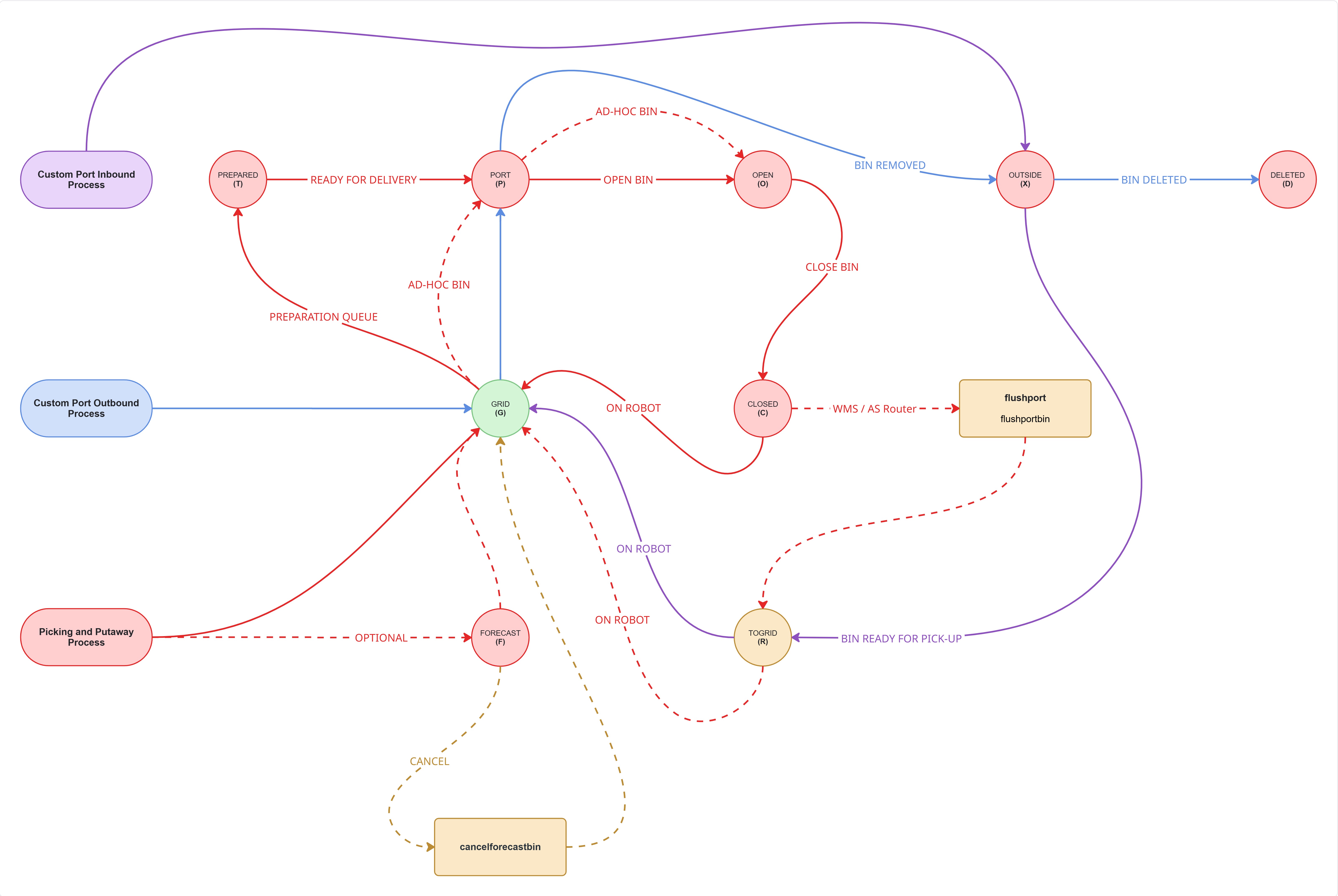
Bin mode transitions.
Modes Set By Port
Ports are the only type of module that can set bins to the modes OPEN, CLOSED, or PORT.
Mode PORT is applied immediately after a bin is confirmed to be in the port following a drop-off operation by a robot. The bin remains in PORT mode until the port presents it, at which point the mode is changed to OPEN.
When the bin is closed via closebin, the port is responsible for setting its mode to CLOSED.
A bin in CLOSED mode can later be moved by the port to a location where a robot can perform a pick-up operation. Once the port positions the bin appropriately, its mode is changed to GRID, which allows the robot to retrieve it.
If a bin is in the port but either in the wrong position or blocking another bin selected by openbin, the port may temporarily set its mode to TOGRID. This mode indicates that the bin is being moved and will eventually transition to GRID mode.
Modes Set By AS Router/Planner
AS Router/Planner module may change a bin’s mode in certain cases. The default mode for a bin in the AutoStore grid is GRID.
| Interface | Description |
|---|---|
| Task Interface | When using the task interface, bins do not need to be set to PREPARED because the AS Router/Planner fully plans when the bin will be sent to a port. |
| Bin Interface | When a bin is prepared in the prepare queue of a bin interface, the AS Router/Planner sets it to PREPARED. This mode is also broadcast by Log Publisher, making it visible to the WMS for deciding when to add the bin to a port queue. |
Bin modePREPAREDis not allowed for a bin in Port.
Modes Set By WMS
Bin mode FORECAST is a special mode that can be set by the WMS.
When WMS sets this mode it indicates to AS Router/Planner that the bin should be dug up, but that this is a low priority job that will only be performed if the system has available robot resources that can be used to dig up Forecast bins.
Typically at night there will be resources to prepare many bins in mode FORECAST. When dug up these will get mode GRID.
For more information aboutFORECASTbin preparation check this section.
Updated 28 days ago