
Configuration Example
Overview
A grocery or fresh food distribution center operates an AutoStore system to fulfill online customer orders across three temperature categories: ambient, chilled, and frozen. The facility handles a wide range of SKUs including dry goods, canned food, and household items at room temperature, dairy, fresh produce, and deli products in a chilled environment, and ice cream, frozen meals, and frozen vegetables in a dedicated frozen zone.
To maintain product integrity and comply with food safety regulations, these temperature categories must be strictly separated within the grid so that a robot never places a chilled bin into a frozen cell or vice versa. The system uses AutoStore's cell content and mixed bin type functionality to enforce this separation at the controller level.
Grid Layout
The grid is divided into six content areas across two bin sizes, organized into a storage layer for piece-level picking and a staging layer for assembled orders awaiting dispatch.
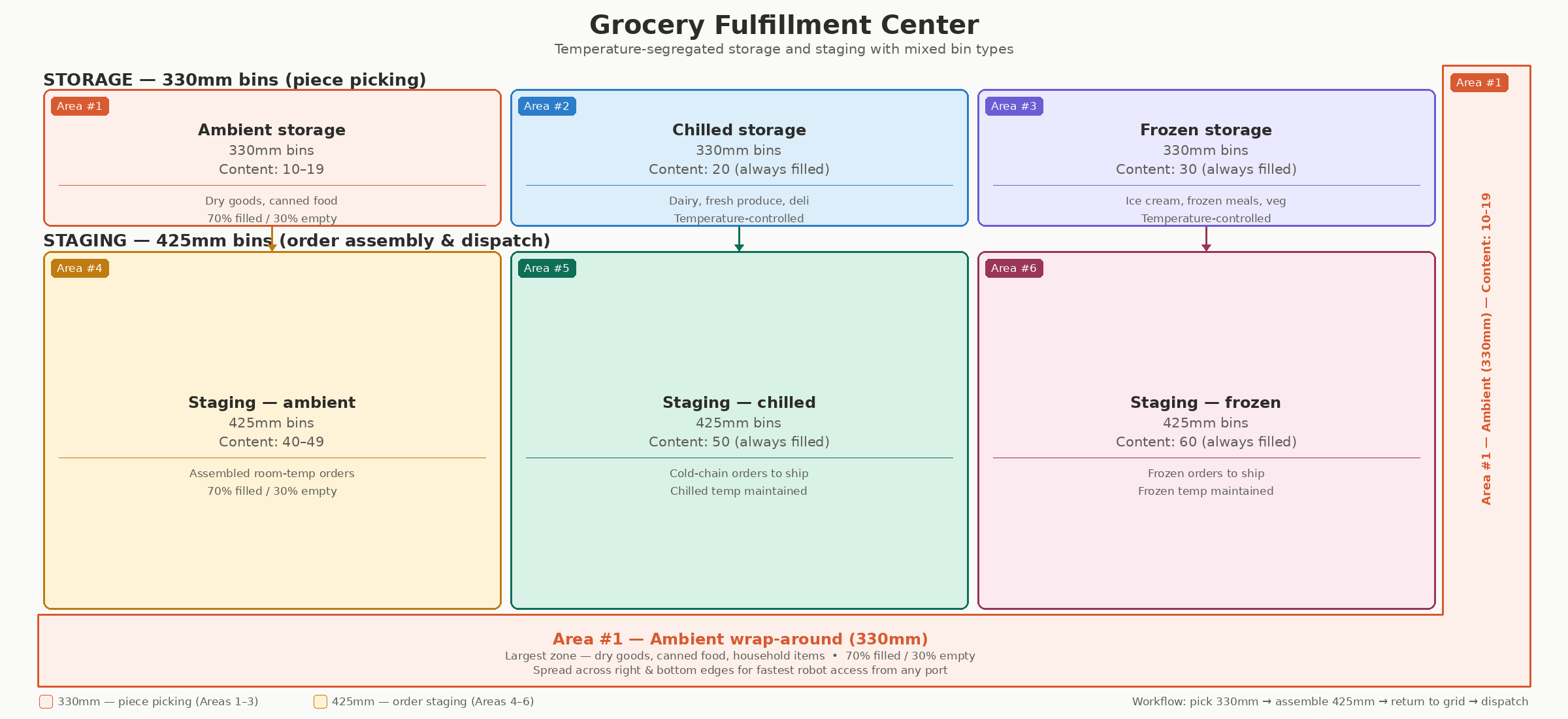
Grid layout.
Storage Areas (330mm bins)
Areas 1 through 3 use 330mm bins for piece-level storage and picking. These hold individual items or smaller quantities that operators pick at workstation ports to assemble customer orders.
- Area 1 — Ambient is the largest area, wrapping around the right side and bottom of the grid. This maximizes coverage and minimizes robot travel distances for the highest-volume SKUs such as dry goods, canned food, and household items. Ambient products typically make up the majority of a grocery catalog.
- Area 2 — Chilled is a dedicated zone for temperature-sensitive fresh products including dairy, fresh produce, and deli meats.
- Area 3 — Frozen is a dedicated zone for frozen products including ice cream, frozen meals, and frozen vegetables.
Staging Areas (425mm bins)
Areas 4 through 6 use 425mm bins for order staging. These taller bins hold assembled orders or bulk quantities that are ready for dispatch. After an operator picks the required items from the 330mm storage bins, the completed order is placed into a 425mm staging bin and returned to the grid to await the delivery truck.
- Area 4 — Staging ambient holds assembled room-temperature orders.
- Area 5 — Staging chilled holds cold-chain orders maintained at chilled temperature until dispatch.
- Area 6 — Staging frozen holds frozen orders maintained at frozen temperature until dispatch.
The staging areas sit in the center of the grid where they can be served by ports equipped with R5+ robots that are compatible with the taller 425mm bin size. Each staging area is paired with its corresponding storage area so that completed orders remain within the correct temperature environment from assembly to dispatch.
Content Sets And Codes
Each area is assigned a unique content set with non-overlapping content codes. Every cell in the grid is explicitly configured with a cell content value matching its area, and each area is locked to its bin type through the area bin type configuration. This guarantees that the controller will never mix bin types or temperature zones within the same cell.
| Area | Cell Content Value | Bin Type | Bin Content Codes | Description |
|---|---|---|---|---|
| Area #1 — Ambient | 1 | 330mm | 10 (empty), 11–19 (filled) | Ambient piece-level storage |
| Area #2 — Chilled | 2 | 330mm | 20 (always filled) | Chilled piece-level storage |
| Area #3 — Frozen | 3 | 330mm | 30 (always filled) | Frozen piece-level storage |
| Area #4 — Staging ambient | 4 | 425mm | 40 (empty), 41–49 (filled) | Ambient order staging |
| Area #5 — Staging chilled | 5 | 425mm | 50 (always filled) | Chilled order staging |
| Area #6 — Staging frozen | 6 | 425mm | 60 (always filled) | Frozen order staging |
Content Set Ranges
| Content Set | Range | Notes |
|---|---|---|
| 1 | [10, 19] | Supports both empty (10) and filled (11–19) bins for flexible ambient inventory |
| 2 | [20, 20] | Single code — all chilled bins are always filled |
| 3 | [30, 30] | Single code — all frozen bins are always filled |
| 4 | [40, 49] | Supports both empty (40) and filled (41–49) bins for flexible staging capacity |
| 5 | [50, 50] | Single code — all chilled staging bins are always filled |
| 6 | [60, 60] | Single code — all frozen staging bins are always filled |
Ports must be explicitly configured for their supported bin type. There must be dedicated ports for 330mm bins and separate ports for 425mm bins.
Operational Workflow
-
Inbound replenishment — Products arrive at replenishment ports and are placed into 330mm bins assigned to the correct temperature area (ambient, chilled, or frozen).
-
Order picking — When a customer order comes in, the WMS instructs AutoStore to deliver the relevant storage bins to picking ports. Operators pick the required items from the 330mm bins.
-
Order staging — Picked items are placed into 425mm staging bins matching the temperature category. The staging bins are returned to the grid and held until a delivery truck is ready.
-
Dispatch — At dispatch time, the staging bins are presented at outbound ports for loading onto the delivery vehicle.
This design eliminates the need for separate conveyor systems or external staging areas for each temperature zone, keeping the entire fulfillment process within the AutoStore grid and reducing both labor and floor space requirements.
Updated 9 days ago