
Task Group Sequencing (Synchronizing)
Synchronizing with the Task Group Sequence
Purpose
- To allow external systems or processes to view and align with the sequence of task groups AutoStore plans to deliver to a port, enabling synchronization (e.g., with box erectors or upstream processes) without manually controlling the order.
How It Works
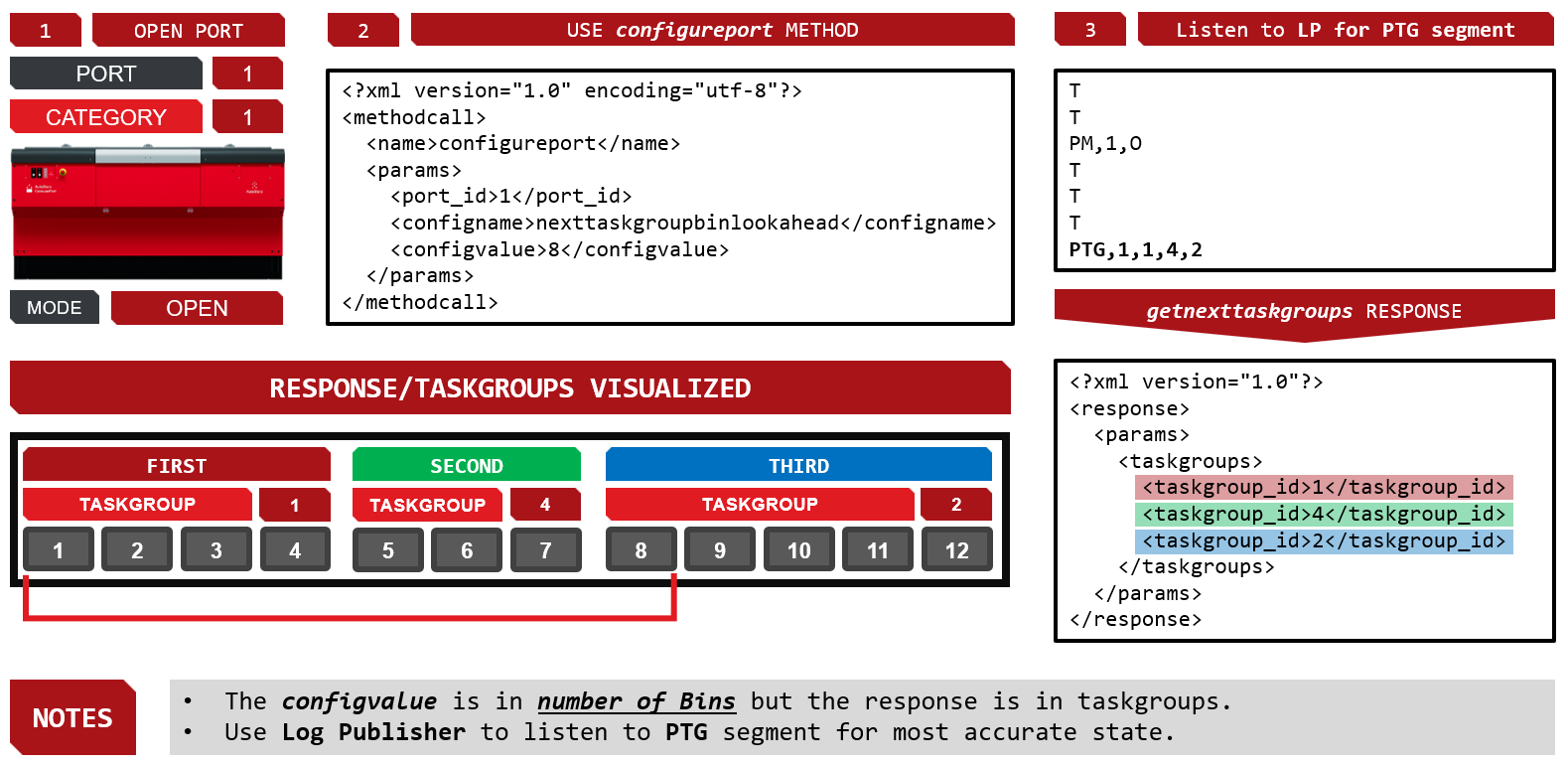
- Open the port as usual (category, mode open).
- Use the
configureportmethod with the settingnexttaskgroupbinlookaheadand a value (e.g., 8) to specify how many upcoming bins/tasks you want visibility into. - After setting the
nexttaskgroupbinlookaheadAutoStore will immediately and continually start locking taskgroups based on the configured lookahead value. - Any time a new task group is overlapping into the lookahead zone the system will send a new PTG segment via the log publisher.
- AutoStore responds with a list of task groups (not bins) that will be delivered next, based on your look-ahead value. The configuration is set in number of bins/tasks, but the response is in task groups.
- Once AutoStore provides this sequence via the log publisher, it becomes locked—AutoStore must deliver those task groups in the given order.
- The planned sequence can also be accessed via the
getnexttaskgroupsAPI query method; however, for the most immediate and up-to-date information, the WMS should always listen to the log publisher.
Key Nuances
- The look-ahead value is in bins/tasks, but the returned sequence is in task groups.
- After the sequence is published, it is locked; if a bin/task group in the sequence is delayed (e.g., being picked at another port), the port will wait for it, potentially causing delays.
- This method is for synchronization, not strict sequencing. If you need to explicitly control the order, use port sequence mode instead.
Best Use Case
- When you need to synchronize external processes with AutoStore’s internal picking sequence, but do not require strict manual control over the order of the task groups.
Updated 15 days ago