
Port
Port Properties
The following properties are common for both Task Interface and Bin Interface. (Properties that are interface
dependant are described in the respective chapters.)
port_id:
The port_id is a unique identifier that identifies a port.
port_mode:
The current mode of operation.
The port_mode is set by the openport method.
The port_mode is set to CLOSED by the closeport method.
selected_bin:
The selected_bin is the next Bin to be handled in the Port. It can be the current open bin in the Port or on the
way to be delivered in the Port.
The selected_bin property is set to the bin_id returned by the openbin method.
The selected_bin property is cleared by the closebin, removebin, and closeport methods.
In port mode AUTO, the selected_bin is cleared when the bin is confirmed in port.
The selected_bin will be delived to port and is not affected by changes in the port queue or task groups. The
only way to cancel a selected_bin before it is delivered is to close the port.
Port Mode
The port_mode is the current mode of operation of the port. The port_mode is controlled by the WMS.
Ports that are not in use by operators should be closed, set to Port Mode CLOSED. AutoStore will plan work
and allocate robot resources for open ports, so in order to avoid wasted performance it is important to close
ports that are not in active use. Also, there may be bins in an open port that are needed by other ports, and
these bins will be blocked until the bins are handled (or the port is closed).
The following modes are available:
| Mode | Description |
|---|---|
| CLOSED | The port is closed. |
| OPEN | Default mode. The port is open for picking or receiving goods. |
| AUTO | The port is open for picking or receiving goods, and will automatically open bins.(Deprecated.) |
| INSERT | Special mode. The port is open for bin insertion. |
| SWAP | Special mode. The port can be used for exchanging bins between grids. |
| MOVE | Not used. |
| SEQUENCE | Special mode. Task Interface only. The port is open and will deliver the defined sequence of task groups. |
| DISABLED | The port is disabled. See section about MultiPort. |
| MULTIPORT_PUPPET | The port ID is disabled. The port module is controlled by a MultiPort. |
| RUNOUT | AutoStore will not plan anymore taskgroups to be delivered to port, the selected taskgroup is the last one. |
The port mode INSERT is used to add bins to AutoStore. This mode is used during the installation of of the
system. This mode may also be used in installations where the bins temporarily leave the grid (for instance
where multiple ports are connected through conveyor-belt systems).
The port mode AUTO automatically opens bins in the Port, and is used in conjunction with the Port Interface.
In this mode, the WMS does not use the openbin and closebin messages. AutoStore will automatically
generate openbin and removebin commands and provide a stream of bins according to the port queue.
DeprecatedThe port mode AUTO is deprecated and should not be used by new installations.
PickUpPort
The PickUpPort is typically used by customers to collect prepicked packages in a public zone. Bins are
delivered into a drawer that can be manually opened and closed by the user. Bins are not delivered directly in
front of the user. Instead, bins are delivered into the drawer and the users must manually open the drawer to
access the bins. The port includes a locking mechanism that can lock the drawer. The port also includes a
visual indication (light) of the state.
For most port types, the bin in mode OPEN is automatically delivered in front of the user. For the PickUpPort,
the current bin (bin mode OPEN) is available for the user in the sense that it is delivered into the drawer and
drawer is unlocked. The user must manually open the drawer to access the bin. The drawer can be manually
closed and reopened as long as the bin mode remains OPEN. When the WMS logically closes the bin
(closebin) the bin mode becomes CLOSED and the snap lock is enabled. The drawer may still be in the open
position but when the drawer is closed the snap lock will prevent it from being reopened.
The WMS can use the method getdrawerstate to inspect the actual physical state of the drawer. The drawer
state is also available from Log Publisher. The WMS may, for instance, check that the drawer is open before
instructing the user to pick from it, and check that the drawer has been closed before finishing the session.
Fusion Port
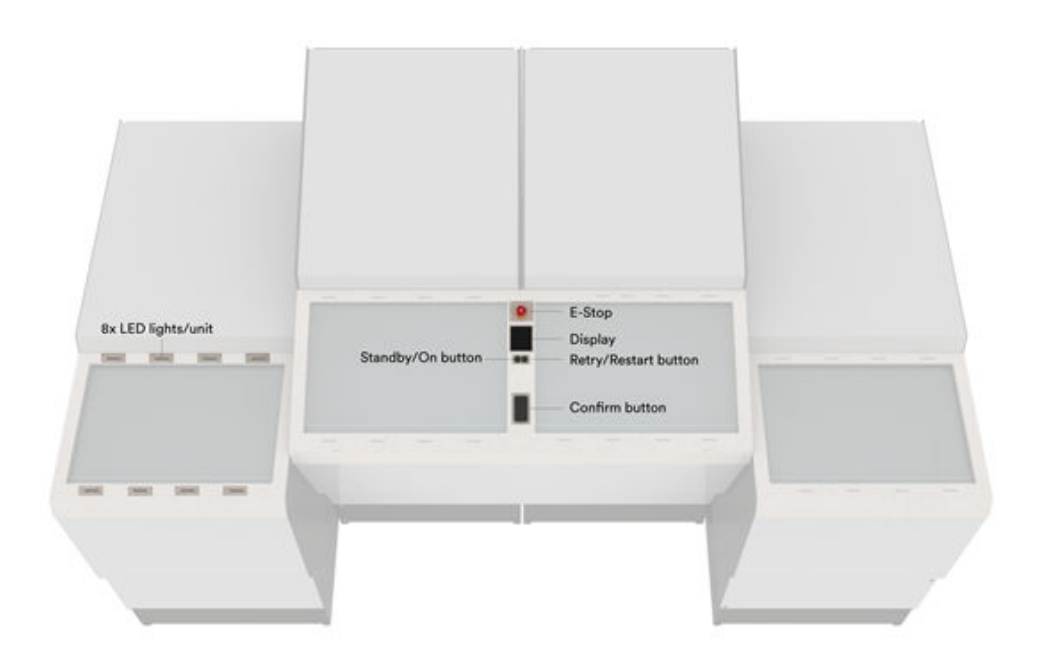
The Fusion Port Staging has four sub-modules. Each of these sub-modules may present bins independant of
each other. In a typical pre-picking use case, the two locations in the middle are used as source locations to
pick from. These two locations tilt the bin for better picking ergonomy. The two locations at the sides are
typically used as target locations to pick into. These two locations do not tilt the bin.
The Fusion Port HMI includes:
▪ Pick-To-Light: Led strips indicate the source and target compartments
▪ Display: Shows the number of items to pick
▪ Confirm Button: A button that can be used to confirm the pick
The four sub-modules of the Fusion Port Staging are four logical Ports with separate Port IDs. The WMS controls
the bin delivery to these ports like standard port processes. Each of these ports are controlled separately by
the openport/openbin/closebin/closeport messaging.
The typical use case is to open the two source ports as standard picking processes, and the two target ports
as standard put-away processes that request empty bins to store the pre-picked orders. One straightforward
approach could be to always pick from the left source bin to the left target bin, and from the right source bin to
the right target bin. But the WMS may implement more advanced batch picking strategies by controlling the
bin flow to each individual port.
Port Carousel Behavior
Due to the way the carousel arms work together, repeating the same Bin with only one other Bin in between is
very inefficient.
It is strongly recommended to avoid the following Bin sequence on Port Carousels:
... Bin A - Bin B - Bin A ...
NOTICEEven though the above sequence will work, and may sometimes be required by the WMS, it should be
avoided whenever possible in order to obtain optimal performance.
Updated 2 months ago