
Pick-To-Light API
The Pick-To-Light API supports the visual indication to the operator: showing the number of items to pick on
the display and lighting led strips that indicate the source compartment to pick from and the target
compartment to pick into. The Log Publisher includes feedback when the operator pushes the confirm button
for a specified pick operation.
The concept is based on Pick-To-Light commands (PTLs) created by the WMS. One PTL represents a picking
operation and includes the required details (items to pick, source bin and compartment, target bin and
compartment). The method showpicktolight creates a PTL and the method hidepicktolight deletes a PTL.
The PTL has a status that can be one of the following values:
Registered: PTL registered and waiting to be active.
Active: PTL active. Bins are open, display and led strips are active.
Confirmed: The PTL has been confirmed by pushing the confirm button.
The WMS may send multiple PTLs, but only one PTL per source port and target port combination. A PTL is
not activated until both the source bin and the target bin are open in their respective ports. The target
information is optional. For putaway operations or when picking into an external tote, we only need to specify
the source information.
The confirm button confirms the active PTL (sets the status value = Confirmed) and turns off the leds. The
confirm button has no effect if there are no active PTL. The confirm button does not automatically close any
bins, it only changes the status of the PTL. The WMS must use closebin to close bins.
The Log Publisher segment PTL reflects updates and status changes to PTLs so it also informs when a PTL is
activated (bins arrived in port) or completed (confirm button is pushed).
It is possible to use the visualization part of Pick-To-Light without using the confirm button. Closing a bin will
automatically delete the active PTL (status = Active) that belongs to the port where the bin is closed. The
WMS may use hidepicktolight instead of closing the bin if it wants to keep the bins in the port for more picks.
Closing a port will delete all PTLs related to that port.
AutoStore will remember the PTLs in case of the WMS disconnects from the Log Publisher. A new connection
to Log Publisher will receive the status of the existing PTLs, also including status=Confirmed. A new PTL for
the same source port and target port combination will overwrite the old.
Compartment Definition
The Pick-To-Light API uses the compartment numbering described in this section.
The compartment type (bin configuration) is a code that identifies the size and shape of a compartment.
The following compartment types are defined:
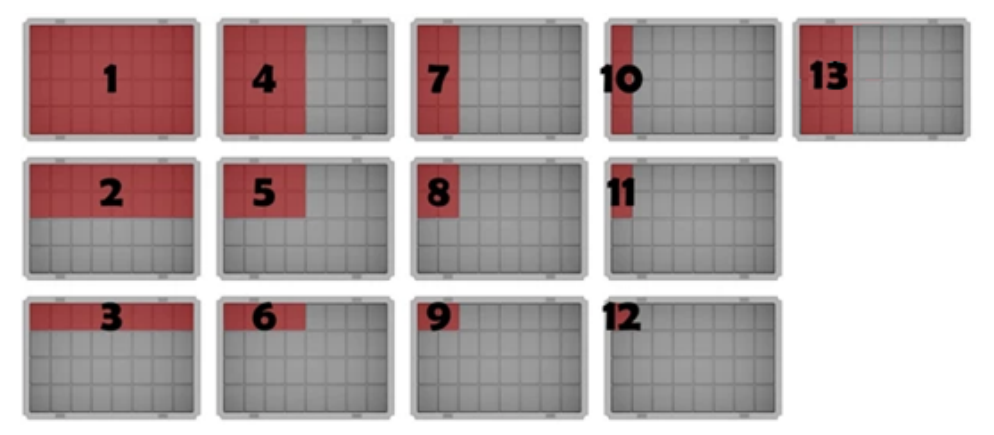
The Compartment ID identifies both the size and shape of the compartment and the compartment's location
inside the bin.
Compartment types 1-8 use a two-digit Compartment ID = Type * 10 + Index.
Compartment types 9-13 use Compartment ID = Type * 100 + Index.
The index starts at 1 and identifies the comparment's location inside the bin. Indexed from the NorthWest
corner of the Bin, from left to right (west to east) for each row.
The Fusion Port supports the following compartment types: 1, 2, 4, 5, 7, 8, 13.
The Fusion Port manages the port's orientation (North vs. South).
Updated 2 months ago