
Content Codes
Bin Content Code
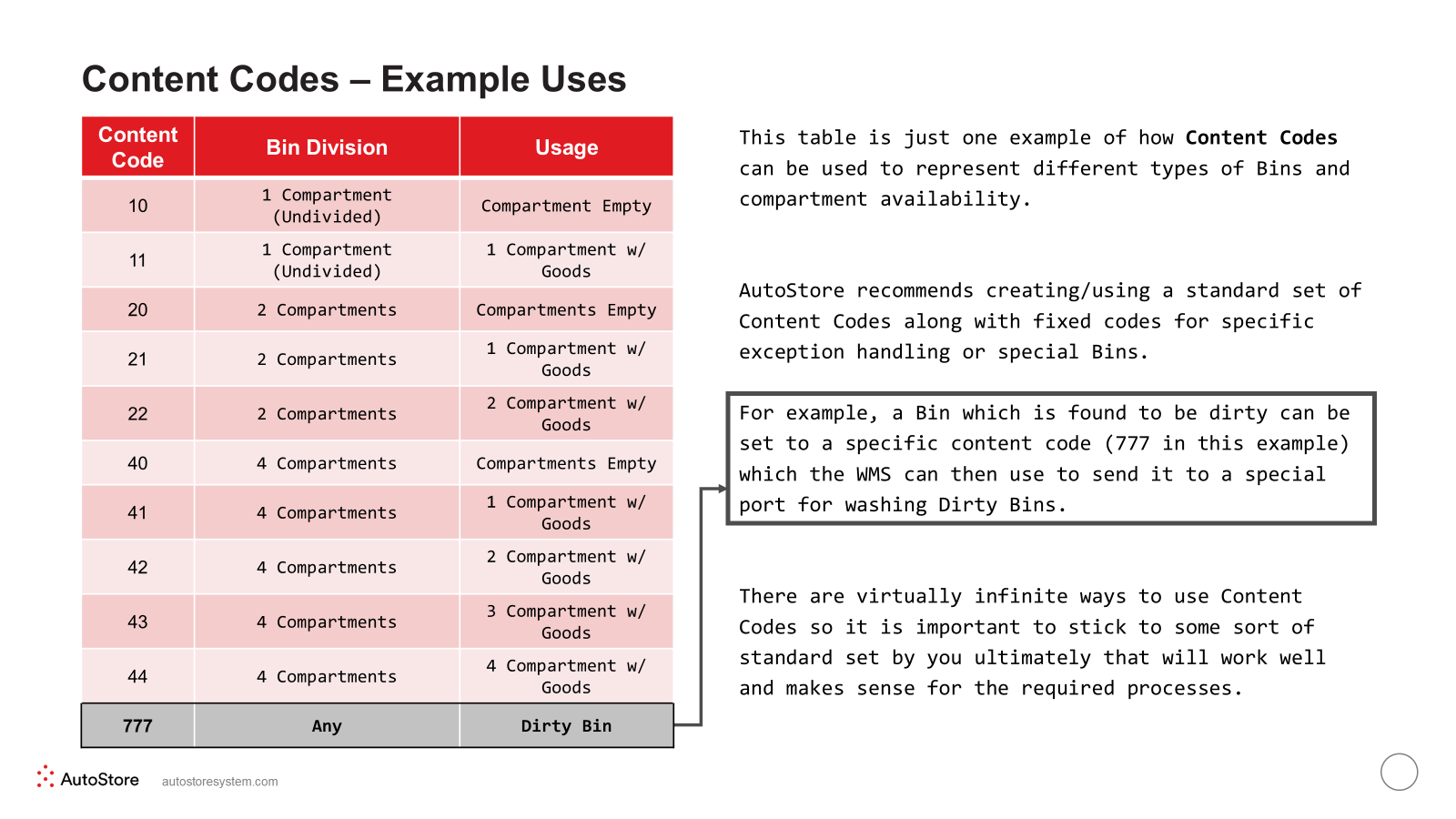
Every AutoStore Bin is assigned a content code. Previously, the content codes specified whether a Bin is
empty or not (and possibly also compartment information). They were used for the put-away process. The
WMS may request bins (in the port queue) by specifying content codes instead of specific Bin IDs.
The same Bin content code is central in Controlling the Location of Bins, but depending on the use case, the
Bin content code may also reflect the inventory of the Bin (SKU or batch).
The Bin content code is controlled by the WMS, and is updated via the interface. The mapping between SKU/
batch and content codes is defined by the WMS. The Bin content code may identify a SKU or a group of
SKUs. The WMS may also use multiple content codes per SKU to control the bin flow
Cell Content Code
Each cell (stack) in the grid can be associated with one or multiple cell content codes.
In cells that have cell content code(s), AutoStore will only store bins that have Bin content code equal to one
of the cell's cell content codes.
When assigning cell content codes to a cell, the following applies:
▪ Cell content code is the same datatype as the Bin content code (integer, range [0-1000000]).
▪ Content code ranges may be used in cases where multiple content codes per cell is needed.
▪ AS Router supports a single value per cell. A content code, content range, or content set.
▪ AS Planner supports up to 8 cell content codes in a cell.
Empty cells without content code are available for bins with any Bin content code (except the case when this
is restricted by the OverflowToFreeCell configuration).
The cell content code is controlled by the WMS and can be updated via the interface during operation. The
cell content code can also be configured by using the AutoStore Console.
Content Code Ranges
A Content Code Range defines a group that incudes a specified range of content codes.
This group can be used as a cell's cell content code and addresses the limitation that a cell only can have up
to 8 cell content codes.
Content code ranges cannot be used instead of content codes in port queues or in openport parameters.
Content code ranges are defined by using AutoStore Console.
Content Code Sets
A content set is a set of content codes and ranges.
Example set #1: 11
Example set #2: 23
Example set #3: -4 (includes content codes 3, 4, 6, 8, 30, 31, 32, 33, 34)
Content set is a new concept only supported by ASRouter. Content sets can be used as cell content values (per cell), and the cell content related system configurations.
Content Code Usage Examples
Updated 2 months ago